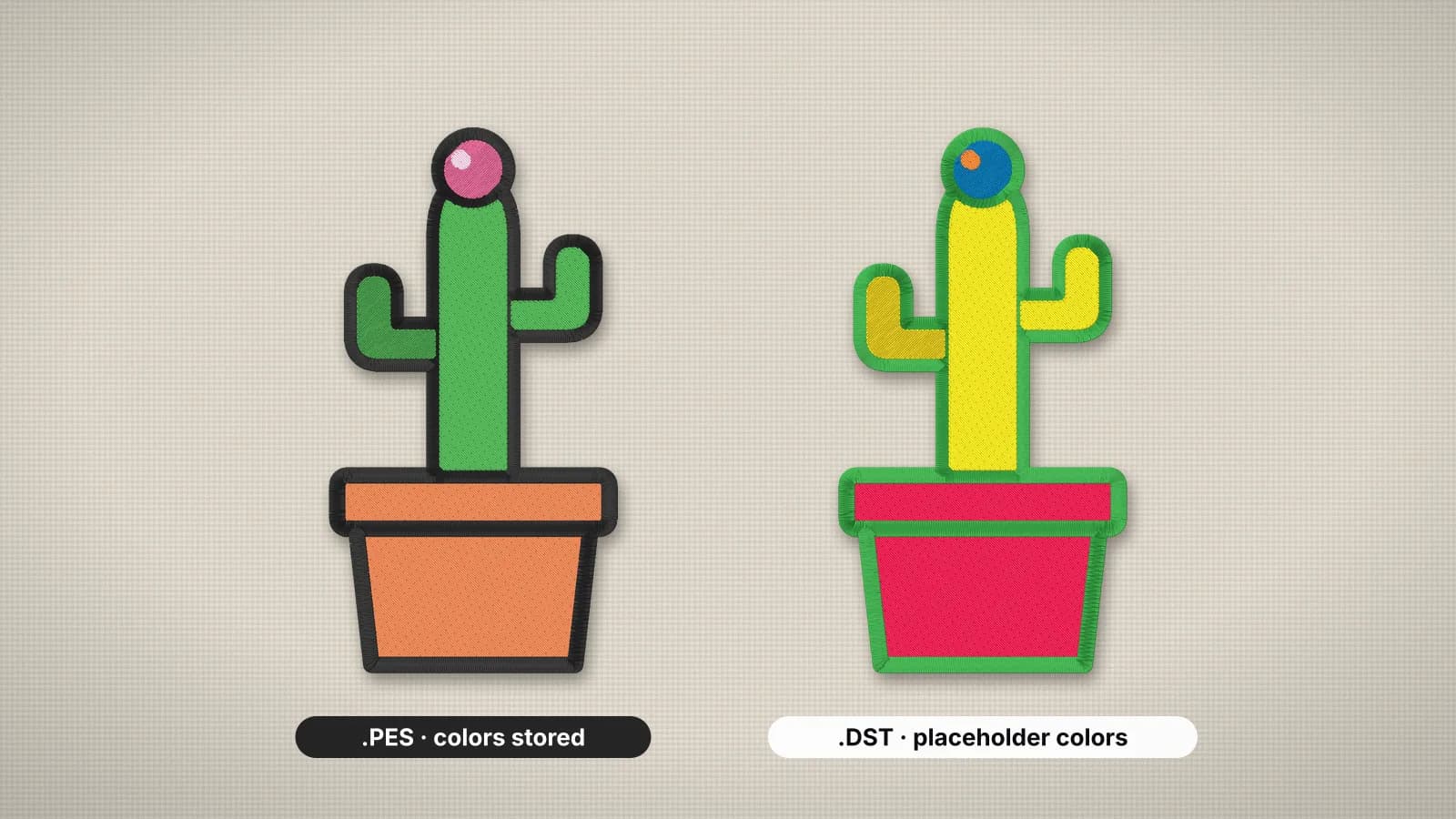
PES and DST are the two embroidery formats you'll meet most often. PES is Brother's format, used by Brother and Baby Lock machines, and it stores your thread colors. DST is Tajima's format, read by almost every commercial multi-needle machine, and it doesn't store colors at all.
The short answer: use PES if you sew on a Brother or Baby Lock machine, and DST if the file is going to a commercial machine or an embroidery shop. The stitches themselves are the same in both, so you can convert either way without losing a single one.
PES and DST compared
| Feature | PES | DST |
|---|---|---|
| Made by | Brother | Tajima |
| Main machines | Brother and Baby Lock home and multi-needle machines | Tajima and most other commercial multi-needle machines; many home machines also read it |
| Thread colors | Stored, with names, plus Brother palette colors for the machine | Not stored; only the points where the color changes |
| On the machine screen | The design in its thread colors, with each change listed | Default placeholder colors |
| Preview thumbnail | Yes, shown on Brother screens | No |
| Trims | Trim commands Brother machines follow | No trim command; trims are written as short runs of jumps |
| Stitch precision | 0.1 mm steps | 0.1 mm steps |
| Best for | Sewing on your own Brother or Baby Lock machine | Sending to shops and commercial machines |
PES: Brother's format, with colors
PES started with Brother's PE-Design software and is the native format of Brother embroidery machines. Baby Lock machines are built on the same platform, so they read the same files.
A PES file has two parts. The PES section holds the design for software, including each thread's color and name. Inside it is a PEC block, which is what the machine actually reads: the stitches, a color for each change from Brother's 64-color palette, and the small thumbnail you see on screen. Embrizo writes PES version 6.
Because the machine shows Brother's palette, a brand color snaps to the closest Brother thread on screen. That only affects the display. You can still sew with any thread you like.
Try it with your own design
Sign up free, upload an image and get a stitch preview in under a minute.
Drop your image here
PNG, JPG, WebP or SVG · stays on your device
DST: Tajima's format, without colors
DST comes from Tajima and became the common language of commercial embroidery. Nearly every multi-needle machine and embroidery program opens it, which is why shops and digitizers exchange designs as DST.
A DST file is little more than the stitches: a short header with the design name, stitch count and size, then needle moves, jumps and color stops. It records where the color changes, not what the color is. On a multi-needle machine that works naturally, because the operator assigns each color stop to a needle that is already threaded.
Two limits are worth knowing. A single DST stitch can be at most 12.1 mm, so longer moves are split into jumps. And DST has no separate trim command: trims are written as a short run of jumps that commercial machines read as a trim. Home machines that read DST handle these differently, and some leave the jump threads for you to clip.
A DST file doesn't say which threads to use. Always send the color sheet with it, or the design may be sewn in whatever happens to be on the needles.
Which format should you use?
- Brother or Baby Lock machine: PES. The screen shows the right colors and the machine prompts each thread change. Many Brother models also read DST, but the colors will be placeholders.
- Commercial machine (Tajima, Barudan, SWF, Ricoma and others): DST, plus the color sheet.
- Sending to an embroidery shop: DST, unless the shop asks for something else.
- Another home brand: usually neither. Use the native format: JEF for Janome, VP3 for Husqvarna Viking and Pfaff, EXP for Bernina, XXX for Singer Futura. The file formats guide covers them all.
- Selling digital designs: include both, plus the other main formats. Buyers expect a ZIP that covers their machine.
You don't have to choose up front. On Embrizo, a design counts as one download however many formats you take, so you can download PES, DST and every other format in one ZIP.
Converting between PES and DST
Converting keeps every stitch exactly, because both formats store needle positions in the same 0.1 mm steps. What changes is the color information.
- PES to DST: the stitches and color stops carry over, but the thread colors can't. With PES to DST, download the ZIP to get a color sheet with the thread order.
- DST to PES: there are no colors to carry over, so each color block gets a distinct default color. Set the real threads before you download from DST to PES, and the Brother screen shows them.
- Either way: check the size, colors and stitch count in the embroidery file viewer before you sew.
What a round trip loses is the extras. PES thread names and the thumbnail don't survive a pass through DST, so keep the original PES and convert from it rather than from a DST copy.
Converting is not resizing. Scale either format by more than about 10% and the density goes wrong. If you're starting from an image, skip conversion and digitize straight to the format you need, for example image to PES.