Embroidery glossary
55 machine embroidery terms in plain English, from appliqué to zigzag underlay, with links to the guides and tools that put them to work.
#
- 3D puff
- Raised embroidery made by sewing dense satin over a sheet of foam; the excess foam is torn away, leaving the stitches standing up from the fabric.
- 3D puff is popular on caps for bold letters and simple logos. It needs its own digitizing: satin columns wide enough to hold the foam (often 3 mm or more), higher density than usual and closed-off column ends so the foam doesn't show. Embrizo doesn't make puff files; it's a specialist technique, and the digitizing cost guide covers when a professional digitizer is worth it.
- See also Satin stitch, Cap frame, Digitizing
A
- Appliqué
- A technique where a piece of fabric is stitched onto the base fabric to cover a large area, instead of filling it with thousands of stitches.
- An appliqué file usually runs in steps: a placement line showing where the fabric goes, a tack-down stitch to hold it, a stop (usually coded as a color change) while you trim the excess, then a satin or bean border that covers the raw edge. It cuts the stitch count of large shapes such as varsity letters and keeps them soft. Embrizo doesn't create appliqué sequences; it's a specialist technique, usually done by hand in desktop software or by a professional digitizer.
- See also Satin stitch, Stitch count, Color change
- Auto-digitizing
- Software turning an image into a stitch file automatically, choosing stitch types, angles, underlay and sewing order without manual editing.
- Results depend on clean artwork and on how well the software reads each shape. Embrizo is an auto-digitizer: after a free sign-up it digitizes PNG, JPG, WebP or SVG in your browser, separates the colors into threads, sews narrow shapes in satin, larger areas in tatami fill and fine lines in running or bean stitch, and adds underlay and pull compensation for the fabric you pick. You can override the stitch type of any color; see how the software works. Detailed crests, 3D puff and appliqué still suit hand digitizing.
- See also Digitizing, Sewing order (sequencing), Underlay
B
- Backing
- Stabilizer placed under the fabric while it is stitched; the word is often used to tell it apart from a topping laid on top.
- Backing takes the pull of the stitches so the fabric keeps its shape. The main choice is tear-away for stable wovens and cut-away for anything that stretches, with a heavier or second layer for dense designs. It is hooped together with the fabric, or the item is floated on an adhesive backing.
- See also Stabilizer, Topping, Floating
- Bean stitch
- A running stitch sewn three times over each step (forward, back, forward), giving a bold line without using a satin column.
- Bean stitch is used for outlines that need to stand out, especially on textured fabrics where a single running stitch disappears. It triples the stitches along the line, so on very small details it can look heavy. Embrizo uses running or bean stitch for lines thinner than about 0.75 mm, where a satin column would be too narrow.
- See also Running stitch, Satin stitch
- Birdnesting
- A tangle of top thread that builds up under the fabric, on the needle plate, usually from a threading, tension or hooping problem.
- The most common cause is top thread that has slipped out of the tension discs or take-up lever, so rethread the top thread completely first. Fabric that bounces with the needle (flagging) because it is hooped loosely, a badly seated bobbin and a blunt or bent needle are the next suspects. The problems and fixes guide walks through these checks.
- See also Thread tension, Bobbin, Hooping
- Bobbin
- The small spool under the needle plate that holds the lower thread, which locks with the top thread to form every stitch.
- Home machines typically take a small drop-in or front-loading bobbin, while commercial heads often use L-style bobbins in a bobbin case. Many embroiderers buy prewound bobbins, which hold more thread and wind evenly. Running out of bobbin thread mid-design is a normal stop; many machines let you step back a few stitches and carry on.
- See also Bobbin thread, Thread tension
- Bobbin thread
- The finer thread wound on the bobbin, usually white or black, that forms the underside of every stitch.
- Bobbin thread is typically lighter than top thread, often around 60–90 wt, so it adds little bulk under the design. Match its color to the fabric, or to the top thread where the back will show, such as on towels. With balanced tension, the back of a satin column shows bobbin thread down roughly its middle third, with top thread on either side.
- See also Bobbin, Thread tension, Thread weight (40 wt)
C
- Cap frame
- A curved frame that holds the front of a cap under the needle, mounted on a cap driver on commercial multi-needle machines.
- The cap driver turns the curved front as it sews, and a structured cap usually has a usable height of only about 2–2.25 in (50–57 mm). Some home machines offer a flatter cap frame accessory with a small sewing field. Caps sew best from the center out and the bottom up; Embrizo plans its sewing order to cut trims rather than for caps, so cap-specific sequencing is a specialist job. The hat embroidery guide has sizes and tips.
- See also Hoop, Sewing order (sequencing), Multi-needle machine
- Color change
- A command in an embroidery file that marks where one thread ends and the next begins, so the machine stops for rethreading or switches needles.
- On a single-needle machine every color change is a manual rethread, so each extra color adds real time; a multi-needle machine switches needles itself. Formats such as DST and EXP mark where the color changes but not which color comes next, so you follow the color sheet. Embrizo separates your artwork into threads, lets you lower the number of colors or merge them, and its design check flags designs with more than 12 colors.
- See also Color sheet, Single-needle machine, Multi-needle machine
- Color sheet
- A list of a design's thread colors in sewing order, used to thread the machine or load the needles in the right sequence.
- A color sheet matters most for DST and EXP, which store color changes but not the colors themselves. Embrizo includes a TXT color sheet with every download, listing the size, stitch, color and trim counts, then each color in order with its thread, hex value and stitch count. Look up thread codes in the thread color chart.
- See also Color change, DST file, EXP file
- Cut-away stabilizer
- A stabilizer that stays in the garment for good: after stitching, the excess is trimmed away around the design.
- Because it keeps supporting the stitches through washing and wear, cut-away is the standard backing for T-shirts, polos, sweatshirts, hoodies and anything else that stretches. No-show mesh is a thin cut-away that is less visible through light-colored knits. Trim it with a small margin rather than close to the stitches; the stabilizer finder helps you choose a backing for your fabric.
- See also Tear-away stabilizer, Stabilizer, Puckering
D
- Density (stitch spacing)
- How closely stitches are packed, usually given as the distance between fill rows or satin stitches in millimeters: smaller numbers mean denser.
- Fill spacing around 0.4 mm is a common starting point for 40 wt thread. Too dense and the design gets stiff, puckers or breaks thread; too light and the fabric shows through. Embrizo defaults to about 0.4 mm, and its fabric presets space rows slightly wider on knits and stretch fabrics and wider again on leather. The density guide goes deeper.
- See also Fill stitch, Stitch count, Thread weight (40 wt)
- Design size and scaling
- The finished stitched width and height of a design. Resizing a stitch file changes its density, so big size changes need re-digitizing.
- A stitch file keeps the same number of stitches when you scale it, so it gets denser when shrunk and sparser when enlarged; changes of around 10% are usually fine. For bigger changes, digitize again from the artwork at the new size. In Embrizo you set the width or pick a hoop preset before downloading, so the stitches are planned for that size; check the fit with the hoop size calculator.
- See also Density (stitch spacing), Hoop, Stitch count
- Digitizing
- Turning artwork into a machine embroidery file by choosing stitch types, directions, density, underlay and sewing order for every shape.
- Digitizing is more than tracing: the same logo needs different settings on a cap, a T-shirt or a towel. It can be done by hand in desktop software, ordered from a digitizing service, or done automatically by an auto-digitizer such as Embrizo. The logo digitizing guide walks through each decision.
- See also Auto-digitizing, Underlay, Sewing order (sequencing)
- DST file
- Tajima's stitch format and the common language of commercial embroidery, read by nearly every multi-needle machine and embroidery program.
- A .dst file stores stitches, jumps, trims and color changes but no thread colors, and single stitches are limited to 12.1 mm. Embrizo writes DST with longer moves split automatically and trims encoded the way Tajima-compatible machines expect, plus a color sheet for the thread order. Make one with image to DST or open one in the DST file viewer.
- See also Color sheet, TBF file, PES file
E
- Edge-run underlay
- A line of running stitches sewn just inside the edges of a shape before the top stitching, to anchor the fabric and give a crisp edge.
- Edge runs hold the outline of a satin column or fill in place, so the top stitches don't pull the fabric in at the edges, and they give satin a slightly raised border. They are the usual underlay for medium satin columns and a common first pass under fills. Embrizo adds edge runs to medium and wide satin columns and walks just inside the edge of larger fills; the heavy underlay level adds them to narrower columns too.
- See also Underlay, Zigzag underlay, Satin stitch
- EXP file
- Melco's expanded stitch format, used by Melco commercial machines and read directly by Bernina embroidery machines.
- Like DST, an .exp file stores stitches, jumps, trims and color changes but not thread colors, so keep the color sheet handy when threading. Single moves are limited to 12.7 mm, and longer ones are split automatically. Make one with image to EXP, or see the Bernina page for the formats Bernina machines read.
- See also DST file, Color sheet
F
- Fill stitch
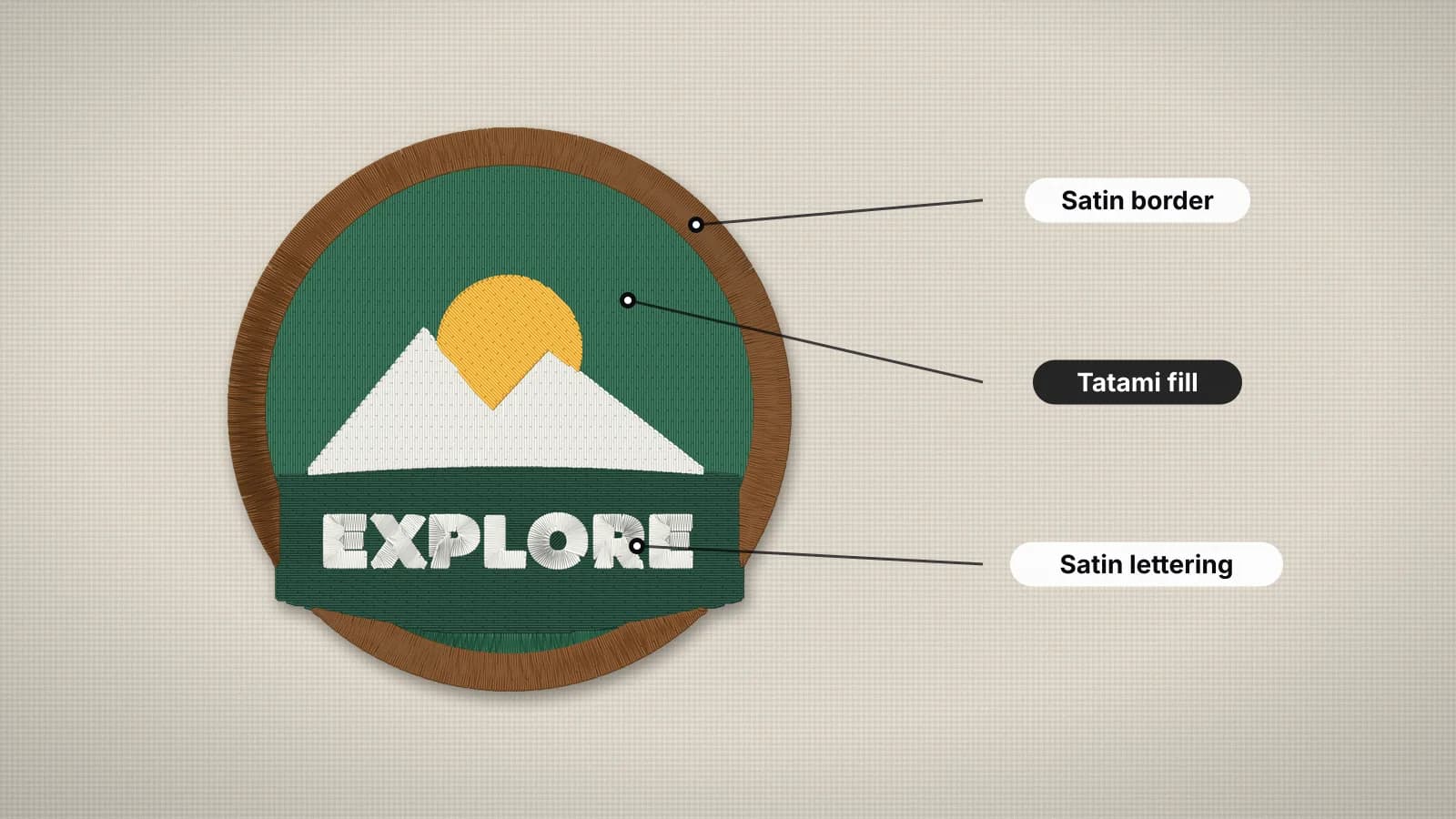
- Rows of stitches that cover the larger areas of a design; tatami is the most common kind.
- Fills take over where satin would be too wide, and they usually make up most of a design's stitch count. Besides tatami, many programs offer patterned or motif fills for texture. Embrizo uses tatami fill for shapes wider than about 6.5 mm, sewing fills first and satin details over them. The satin vs fill guide compares the two.
- See also Tatami fill, Satin stitch, Density (stitch spacing)
- Floating
- Hooping only the stabilizer, usually an adhesive one, and pressing or pinning the item on top instead of clamping it in the hoop.
- Floating suits items that are hard to hoop or would mark: collars, cuffs, small pieces, leather, and thick towels or bags. Score and peel the paper on adhesive stabilizer, or use temporary spray on an ordinary backing. Because the item isn't clamped, dense designs can shift it, so a basting stitch around the design (which many machines can add) helps.
- See also Hooping, Stabilizer, Backing
H
- Hoop
- A two-part frame, closed with a screw or with magnets, that holds fabric and stabilizer taut while the machine stitches.
- Hoops are usually named by their sewing field in inches, so a 4×4 hoop sews about 100 × 100 mm; common sizes are 4×4, 5×7, 6×10, 8×8 and 8×12 in, though brands round differently. Magnetic hoops clamp thick items such as towels and bags quickly and leave fewer hoop marks. Embrizo's hoop presets use those five fields, and the hoop sizes guide lists brand sizes and margins.
- See also Hooping, Cap frame, Design size and scaling
- Hooping
- Clamping fabric and stabilizer together in the hoop so they stay flat and firm while the design is stitched.
- Woven fabric should be taut like a drum, while knits should be flat but never stretched, or they relax into puckers once unhooped. Mark the center and placement lines first, and don't tug the fabric after the hoop is closed. The placement guide shows where to hoop each standard position.
- See also Hoop, Floating, Puckering
J
- JEF file
- Janome's embroidery format, used by Janome Memory Craft and Skyline machines and by Elna machines built on the same platform.
- A .jef file maps thread colors to Janome's palette and also records the smallest standard Janome hoop the design fits. Moves longer than 12.7 mm are split into shorter jumps. Make one with image to JEF or check one in the JEF file viewer.
- See also PES file, Hoop
- Jump stitch
- A move of the hoop to a new spot without the needle sewing, which leaves a loose thread across the surface unless it is trimmed.
- Long moves are split into several jumps to stay within the format's limit, such as 12.1 mm for DST. Many machines trim jumps automatically above a length you set, and short ones are often left and snipped by hand. A good sewing order keeps jumps short and few, often by travelling under areas that will be covered later.
- See also Trim, Sewing order (sequencing), Stitch length
L
- Lock stitch (tie-off)
- A few tiny stitches at the start (tie-in) or end (tie-off) of a stitch run that lock the thread so it can't unravel after a trim.
- Lock stitches are usually three or four very short stitches back and forth, placed where later stitching or the edge of a column hides them. They are needed wherever the thread is cut, and without them stitches can pull out in the wash. Embrizo adds short lock stitches to the start and end of each stitch run automatically.
- See also Trim, Jump stitch
M
- Multi-needle machine
- An embroidery machine with several needles, each threaded with its own color, that changes colors automatically.
- Multi-needle machines commonly have 4 to 15 needles, a larger sewing field, a free arm for sleeves and bags and cap frames, which is why shops often move to one once orders are steady. Most read DST, and many also take their maker's own format, such as U01 on Barudan or TBF on some newer Tajima models. With a DST file, you set each needle's color at the machine from the color sheet.
- See also Single-needle machine, DST file, Cap frame
N
- Needle (size and point)
- Embroidery needles are sized by thickness, often 75/11 for 40 wt thread, and come with ballpoints for knits or sharp points for wovens.
- A ballpoint needle pushes between knit fibers instead of piercing them, which avoids holes and runs in T-shirts and performance wear; a sharp point pierces wovens, cap twill and leather cleanly. Larger sizes such as 80/12 or 90/14 are often used on heavy canvas and denim, while smaller ones such as 65/9 or 70/10 pair with fine 60 wt thread for small lettering. Change needles regularly, since a dull or burred needle causes thread breaks and skipped stitches.
- See also Thread weight (40 wt), Birdnesting
P
- PEC file
- Brother's machine-level stitch format: the part of a PES file the machine reads, saved on its own for older Brother and Baby Lock models.
- A .pec file holds the stitches, a color for each change from Brother's 64-color palette (stored as palette numbers, not exact colors) and the thumbnail shown on the machine screen. Newer machines read PES, which contains a PEC block anyway. Embrizo writes PEC among its extra formats, which helps when a very old machine won't show a PES file; see the Brother page.
- See also PES file, Color change
- PES file
- The native embroidery format of Brother and Baby Lock machines, storing the stitches plus thread colors and names.
- A PES file has a section for software, with each thread's color and name, and a PEC block the machine reads, with Brother palette colors and the on-screen thumbnail. Embrizo writes PES version 6, with colors matched to the Brother thread chart. Make one with image to PES, open one in the PES file viewer, or compare formats in PES vs DST.
- See also PEC file, DST file, Color sheet
- Puckering
- Fabric gathering or wrinkling around the stitching, because the stitches pulled the fabric in more than the stabilizer could hold.
- The usual causes are a backing too light for the fabric, fabric stretched or loose in the hoop, or a design too dense for it, such as a file made for denim sewn on a T-shirt. Fix it with cut-away on knits, flat hooping without stretching, and a file made for the fabric. In Embrizo, the knit and stretch presets lighten the density slightly and add more pull compensation and heavy underlay; see the problems and fixes guide.
- See also Stabilizer, Hooping, Density (stitch spacing)
- Pull compensation
- Extra width added to shapes so they sew at the drawn size, because each stitch pulls the fabric in along its direction.
- Without it, satin columns come out narrower than drawn and outlines miss the fills next to them. Typical values are a few tenths of a millimeter per side, more on stretchy or lofty fabrics. Embrizo adds 0.2 mm per side for wovens, more with the knit, stretch and fleece presets and less on leather; the logo digitizing guide shows the presets.
- See also Push compensation, Satin stitch, Registration
- Push compensation
- Shortening shapes slightly at right angles to the stitch direction, because stitches push the fabric out there while pulling it in along their length.
- Push and pull work together: a circle filled with horizontal stitches tends to sew narrower and taller than drawn. Digitizers offset push by pulling in the ends of satin columns and the matching edges of fills a little. It is often smaller than pull and matters most on dense designs and soft fabrics.
- See also Pull compensation, Stitch angle, Density (stitch spacing)
R
- Registration
- How accurately the parts of a design line up when sewn: outlines on fills, colors against each other, and sections across re-hoopings.
- Poor registration shows as gaps of fabric between colors or outlines that miss the shape they frame. Common causes are fabric shifting from loose hooping or a light backing, missing pull compensation, and a sewing order that jumps back and forth. Embrizo extends lower colors 0.3 mm under the shapes above them and adds pull compensation, which hides small shifts.
- See also Pull compensation, Hooping, Sewing order (sequencing)
- Running stitch
- A single line of stitches from point to point, used for fine details, outlines and travel between areas.
- Running stitches are typically around 2–2.5 mm long; shorter ones follow tight curves better. They also run hidden under later stitching to move between shapes without a trim. Embrizo uses running stitch, 2 mm long by default, for lines thinner than about 0.75 mm.
- See also Bean stitch, Stitch length, Jump stitch
S
- Satin stitch
- Closely spaced stitches that zigzag across a narrow shape from edge to edge, giving the smooth, shiny look of embroidered lettering.
- Satin typically works on columns from about 1 mm up to about 7 mm wide; wider stitches can snag and loosen in the wash, and narrower ones pile up. Embrizo uses satin for shapes up to 6.5 mm wide, turns the stitches with each shape's centerline and fills anything wider. The satin vs fill guide explains when to use each.
- See also Fill stitch, Stitch angle, Underlay
- Sew-out
- Stitching a design on real fabric, often as a test on the same fabric and backing before a job, or the stitched result itself.
- A test sew-out shows what a screen can't: puckering, registration, thread coverage and whether small text reads. Embrizo's digitizer and the embroidery file viewer can play a design stitch by stitch to check the sewing order, but a real sew-out on a spare piece is still the best final check.
- See also Registration, Puckering, Sewing order (sequencing)
- Sewing order (sequencing)
- The order in which a design's shapes and colors are stitched, which affects trims, color changes, registration and how flat it sews.
- Common rules are background before foreground, fills before the satin borders and details that cover their edges, and finishing one area before moving to the next. Embrizo plans the sewing order to cut down trims, sewing fills first and satin details over them. Caps have their own rules, center out and bottom up, and that kind of cap-specific sequencing is a specialist job.
- See also Trim, Color change, Cap frame
- Single-needle machine
- A home embroidery machine with one needle, which stops at every color change so you can rethread.
- Single-needle machines are the affordable way to start, with sewing fields commonly from 4×4 to 8×12 in, but every color is a manual change, so they suit gifts and small runs. Most read their brand's own format, such as PES for Brother, JEF for Janome or VP3 for Husqvarna Viking and Pfaff, and many read DST too. The embroidery business guide compares them with multi-needle machines.
- See also Multi-needle machine, Color change, Hoop
- Stabilizer
- Material hooped with the fabric to support the stitches, so the design keeps its shape and the fabric doesn't pucker.
- The main types are tear-away, cut-away, water-soluble, heat-away and adhesive, chosen by how much the fabric stretches and how many stitches the design has. Stretchy fabrics need cut-away; stable wovens usually take tear-away. The stabilizer finder suggests one for your project, and the stabilizer guide covers each type.
- See also Backing, Cut-away stabilizer, Tear-away stabilizer
- Stitch angle
- The direction stitches run within a shape, which changes how the thread catches the light and which way the fabric is pulled.
- Satin stitches run across a column and should turn with curves, as in the letter S. Fill angles are often varied between neighboring areas so they stand apart even in the same color, and since stitches pull the fabric along their direction, the angle also decides which way a shape shrinks. Embrizo turns satin with each shape's centerline and picks fill angles automatically.
- See also Satin stitch, Tatami fill, Pull compensation
- Stitch count
- The total number of stitches in a design, the main driver of sew time, stiffness and, often, price.
- Shops often price stitching per 1,000 stitches, and fills add stitches fastest. As a rough guide, a 3.5 × 2.5 in left chest logo with about half its area stitched comes to around 4,000–6,000 stitches, while a heavily filled jacket back can pass 50,000. Estimate one with the stitch count calculator; Embrizo reports the exact count, colors, trims and sew time before you download.
- See also Density (stitch spacing), Fill stitch, Design size and scaling
- Stitch length
- The distance between two needle penetrations; each stitch type has a useful range, and formats set a maximum for a single move.
- Running stitches are typically about 2–3 mm, fill stitches around 3–4 mm, and a satin stitch is as long as its column is wide. Very short stitches can pile up and break thread, while long ones snag. Embrizo defaults to 2 mm running stitches and about 3.5 mm fill stitches, and splits moves longer than the format allows, such as 12.1 mm for DST.
- See also Running stitch, Satin stitch, Jump stitch
T
- Tatami fill
- The standard fill stitch: rows of running stitches with the needle points offset from row to row, so no lines form across the area.
- Tatami gives a flat, slightly textured surface that covers areas of any size. Row spacing sets the density, and the row angle changes how it catches the light. Embrizo sews tatami rows 0.4 mm apart by default with stitches about 3.5 mm long, and at its standard underlay level lays a lighter fill at another angle beneath them.
- See also Fill stitch, Density (stitch spacing), Stitch angle
- TBF file
- A Tajima format that can carry needle assignments and thread information as well as stitches, read by some newer Tajima machines.
- Some newer models, such as the SAI, list TBF alongside DST. DST is the safer choice unless your machine lists TBF, since every Tajima reads it. Embrizo writes TBF among its extra formats, and the Tajima page explains the difference.
- See also DST file, Multi-needle machine
- Tear-away stabilizer
- A stabilizer that is torn off around the design after stitching, used on stable woven fabrics that don't stretch.
- Tear-away suits cotton, twill, denim, canvas and most structured caps. For dense fills, two light layers often work better than one heavy one, and supporting the stitches with your thumb while tearing keeps them from distorting. It isn't enough for knits, which need cut-away; the stabilizer finder helps you choose.
- See also Cut-away stabilizer, Stabilizer, Backing
- Thread tension
- The balance between the pull on the top thread and on the bobbin thread, which decides where the two lock together in the fabric.
- With balanced tension the threads lock on the underside, so only top thread shows on the front and the back of a satin column shows bobbin thread down roughly its middle third. Bobbin thread showing on top usually means the top tension is too tight; loops and birdnests usually mean the top thread is too loose or misthreaded. Rethread and test before turning the tension dials.
- See also Bobbin thread, Birdnesting, Bobbin
- Thread weight (40 wt)
- A measure of thread thickness where higher numbers mean thinner thread; 40 wt is the standard for machine embroidery.
- Most designs are digitized for 40 wt polyester or rayon thread, so switching weights usually means changing the density too. Finer 60 wt thread helps tiny lettering, while heavier 30 wt covers faster but needs lighter density. Polyester stands up better to washing and bleach; the thread guide and thread calculator cover choosing and estimating thread.
- See also Needle (size and point), Bobbin thread, Density (stitch spacing)
- Topping
- A thin film, usually water-soluble, laid on top of the fabric so stitches don't sink into pile or texture.
- Topping keeps small text and satin edges crisp on towels, fleece, velvet, corduroy and piqué polos. After stitching, tear away the excess and dab or rinse off the rest. Embrizo's fleece preset adds heavy underlay for the same reason; see how to embroider towels.
- See also Water-soluble stabilizer (wash-away), Underlay, Backing
- Trim
- A command that makes the machine cut the threads before moving to a new area, so no loose jump threads are left behind.
- Each trim takes a few seconds and needs lock stitches on either side, so fewer trims mean a faster, cleaner sew. Formats code trims differently; in DST, for example, a trim is a short sequence of jumps that the machine reads as a cut. Embrizo plans the sewing order to cut down trims and writes them the way each format expects.
- See also Jump stitch, Lock stitch (tie-off), Sewing order (sequencing)
U
- U01 file
- Barudan's stitch format for its commercial multi-needle machines, one of Barudan's numbered U-formats.
- A .u01 file holds stitches, jumps, trims and needle changes but no thread colors, and allows single stitches of up to 12.7 mm. Many shops also run DST on Barudan machines, but U01 is the native choice. Embrizo writes U01 among its extra formats; see the Barudan page.
- See also DST file, Color sheet, Multi-needle machine
- Underlay
- A light layer of stitches sewn first under the visible stitching, to anchor the fabric to the stabilizer and keep the top stitches from sinking.
- Common types are a center run under narrow satin, edge runs under medium columns, a zigzag under wide ones and a light fill at another angle under tatami. Too little lets the fabric show and stitches sink; too much makes thin text lumpy. Embrizo adds underlay automatically at a level you can set from none to heavy, and its fabric presets choose heavy for knits, stretch and fleece and light for leather.
- See also Edge-run underlay, Zigzag underlay, Topping
V
- VP3 file
- The embroidery format of Husqvarna Viking and Pfaff machines and their mySewnet software, storing full thread colors and names.
- A .vp3 file stores the exact RGB color and name of every thread, so the machine shows the design as designed, with stitches grouped per color block and explicit trims between areas. Some older Husqvarna Viking models use HUS or VIP instead. Make one with image to VP3 or open one in the VP3 file viewer.
- See also PES file, Color change
W
- Water-soluble stabilizer (wash-away)
- A stabilizer that dissolves in water, used as a topping on pile fabrics and as a backing for lace and sheer fabrics.
- Thin films are the usual topping for towels and fleece, while heavier fibrous types support free-standing lace, which is stitched on the stabilizer alone. Rinse or dab it away after stitching, and avoid it on fabrics that can't get wet; heat-away stabilizer is the usual alternative there.
- See also Topping, Stabilizer
X
- XXX file
- The embroidery format of Singer machines, such as the Futura series, and of the Compucon software they were developed with.
- A .xxx file stores thread colors and trims, so your color order carries over to the machine, and long moves are split to stay within the format's limits. Make one with image to XXX or open one in the XXX file viewer.
- See also PES file, Color change
Z
- Zigzag underlay
- Underlay sewn as an open zigzag inside a satin column, lifting the satin and covering more of the fabric beneath it.
- Zigzag underlay is used under wide satin columns, often on top of edge runs, so the satin stands up instead of sinking into the fabric. It is kept inside the column edges so it never shows. Embrizo adds a zigzag to wide satin columns, over edge runs at the standard and heavy levels, and the heavy level uses it on narrower columns too.
- See also Underlay, Edge-run underlay, Satin stitch
Free account
Put the jargon to work
Upload a logo or drawing and see satin, fill, underlay and sewing order chosen for you, with every setting still adjustable.
- Digitize and preview any image
- Realistic stitch preview and sew-out
- Download free ready-made designs
- No credit card needed


Your design, ready to stitch
Sign up free, upload an image and see it stitched in under a minute. Your image stays on your device.