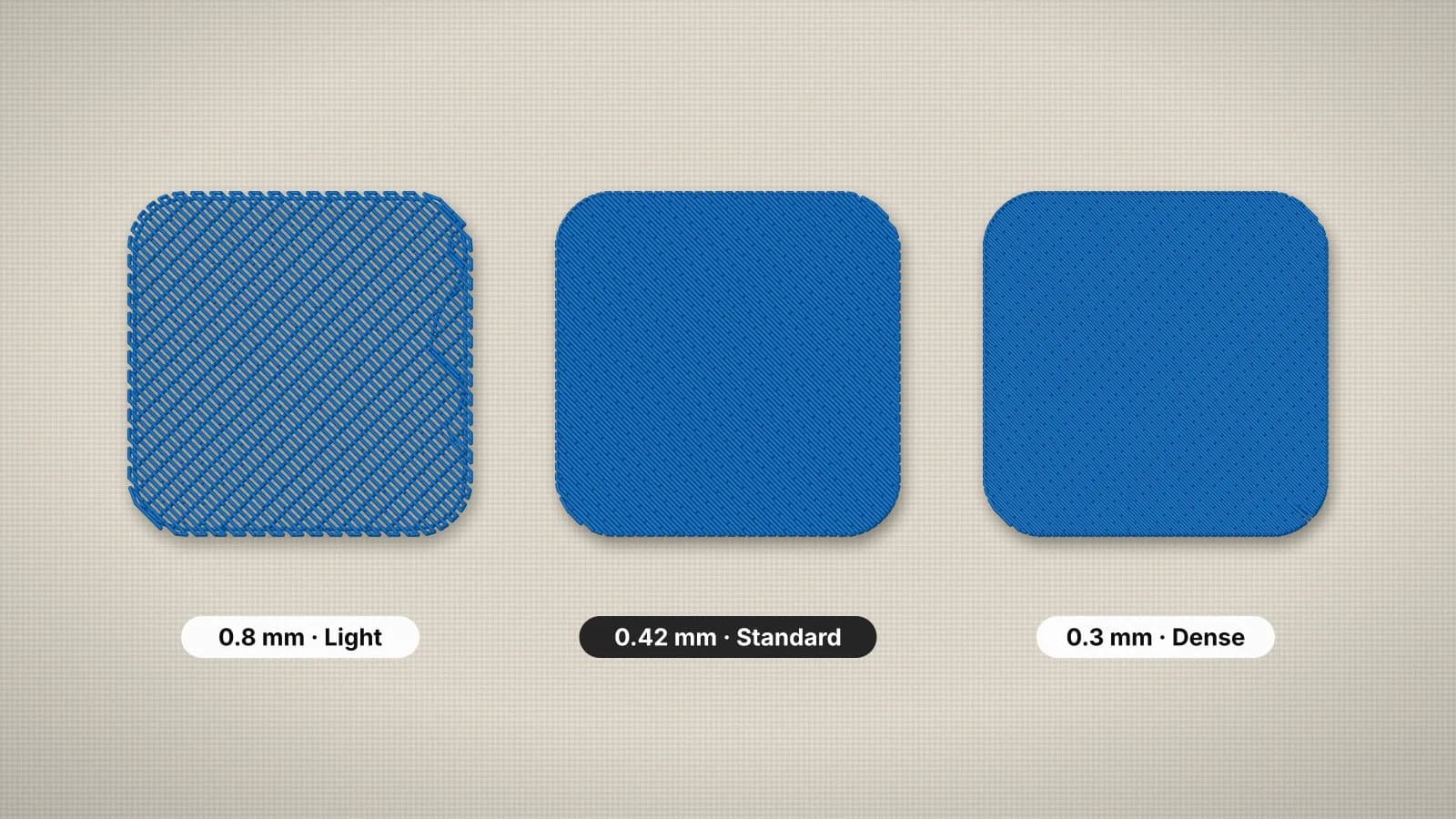
Density is how close together the stitches are. In embroidery it's usually set as spacing: the distance from one row of fill, or one satin stitch, to the next, in millimeters. A smaller number puts the stitches closer together, so the design is denser. A typical fill is around 0.4 mm.
Density decides coverage, stitch count, sew time and how the finished piece feels. Too light and fabric shows through; too dense and the design turns stiff, puckers or even cuts the fabric. This guide explains the numbers, how fabric changes them and when to go lighter or denser. The embroidery glossary defines the other terms you'll meet along the way.
What density and spacing mean
For a fill, spacing is the gap between neighboring rows of stitches. For a satin, it's the gap between stitches along the column. Some programs give density as lines per millimeter or per inch instead. That measures the same thing the other way round, so a higher number there means denser.
| Spacing | Rows per mm | Rows per inch | What it's like |
|---|---|---|---|
| 0.3 mm | About 3.3 | About 85 | Very dense; small solid areas and fine thread |
| 0.4 mm | 2.5 | About 64 | A standard fill for 40-weight thread on most fabrics |
| 0.45 mm | About 2.2 | About 56 | Slightly lighter; common on knits and stretch fabrics |
| 0.5 mm | 2 | About 51 | Light; leather, vinyl and soft items |
| 0.6 mm or more | About 1.7 or fewer | About 42 or fewer | Very light; fabric shows through, for open or textured effects |
Density isn't the same as stitch length. In a fill, stitch length (about 3.5 mm by default in the digitizer) is how long each stitch is along the row; spacing is how far apart the rows are. Stitch length changes the texture, spacing changes the coverage.
Typical density for fill and satin
With 40-weight thread, many digitizers set tatami fill somewhere around 0.4–0.45 mm and satin around 0.35–0.45 mm, then adjust for the fabric and the look. Embrizo's digitizer starts at 0.4 mm for both, and each fabric preset adjusts it:
| Fabric preset | Fill spacing | Satin spacing | Why |
|---|---|---|---|
| Woven | 0.40 mm | 0.40 mm | Stable fabric holds a standard density |
| Knit | 0.43 mm | 0.42 mm | Slightly lighter, so T-shirts and polos stay soft and don't pucker |
| Stretch | 0.45 mm | 0.44 mm | Lighter again, with more pull compensation, for fabric that moves |
| Fleece and towel | 0.40 mm | 0.38 mm | Standard fill over heavy underlay; slightly denser satin so edges stand above the pile |
| Leather | 0.50 mm | 0.50 mm | Fewer needle holes, since every hole is permanent |
In the digitizer's Stitches panel, the Fill density and Satin density settings go from 0.3 to 0.7 mm if you want to change them. Underlay adds to the total too: heavy underlay on fleece puts extra stitches under every shape.
Try it with your own design
Sign up free, upload an image and get a stitch preview in under a minute.
Drop your image here
PNG, JPG, WebP or SVG · stays on your device
How fabric and thread change the right density
- Knits and stretch fabrics go lighter. Dense stitching on a T-shirt makes a stiff patch and pulls the knit into puckers; slightly wider spacing with good underlay and cut-away looks and wears better.
- Fleece and towels need stitches that sit on top of the pile. That mostly comes from heavier underlay and a topping, not a much denser top layer, which would only add stiffness.
- Leather and vinyl go lighter, because closely spaced needle holes can perforate the material like a tear line.
- Canvas, denim and twill, such as a tote bag, take a standard density well. Very dense fills on caps stiffen the front further.
- Light thread on dark fabric shows gaps more, so it may need a step denser, such as 0.4 instead of 0.45 mm.
- Thread weight matters too. Typical values assume 40-weight thread; finer 60-weight covers less, so its files are usually denser. The thread guide covers weights in more detail.
What density does to stitch count, sew time and stiffness
In a fill, stitch count rises roughly in proportion to 1 ÷ spacing. Going from 0.4 to 0.5 mm cuts the fill stitches by about a fifth; going from 0.4 to 0.3 mm adds about a third. For a fully filled 90 × 65 mm (3.5 × 2.5 in) badge, estimated with this digitizer's typical figures:
| Fill spacing | Stitches, roughly | Sew time at 700 stitches a minute |
|---|---|---|
| 0.3 mm | About 8,600 | About 12 minutes |
| 0.4 mm | About 6,400 | About 9 minutes |
| 0.45 mm | About 5,700 | About 8 minutes |
| 0.5 mm | About 5,100 | About 7 minutes |
Sew time follows stitch count, so density is also a cost: many shops price per 1,000 stitches. The stitch count calculator has a fill density setting, so you can see how spacing changes the count and sew time for your own design size.
Stiffness rises with density too, since each extra row is more thread locked into the fabric. A dense full-front fill on a soft hoodie can feel like a plate, while the same design at a lighter spacing, or with open areas, moves with the garment.
When to go lighter or denser
- Go lighter (a bigger spacing number) on knits, stretch fabrics, leather and anything that should stay soft; on large fills such as full fronts and jacket backs; and where heavy underlay or layered fills already add stitches.
- Go denser (a smaller spacing number) when fabric shows through in a test, especially light thread on dark fabric; when you sew with 60-weight thread; for patches and badges that need solid coverage; and when satin edges need to stand above a textured surface.
Change density in small steps, about 0.05 mm at a time, and test each one. A jump from 0.4 to 0.3 mm adds about a third more stitches, and a topping or better underlay often fixes a gap with no extra stiffness.
Why resizing a stitch file changes its density
A stitch file stores stitches, not shapes, so scaling it keeps the same number of stitches. Shrink a design by 20% and the rows end up about 20% closer together: 0.4 mm becomes about 0.32 mm. Enlarge it and the rows spread apart until fabric shows. That's why scaling by more than about 10% is risky, and a new size is better digitized again from the artwork.
In the digitizer you set the final size before you download, so the spacing stays as set at any size. The satin vs fill guide explains which stitch type each shape gets.