Embird alternative: auto-digitize in your browser
Embird is BALARAD's modular embroidery software for Windows. The basic program manages, converts and edits designs; digitizing comes in the separate Digitizing Tools plug-in, whose Trace tool turns the color areas you select in an image into stitch objects. Here's how it compares with Embrizo, and when each one is the better choice.
- Nothing to install
- No credit card needed
- 9 machine formats
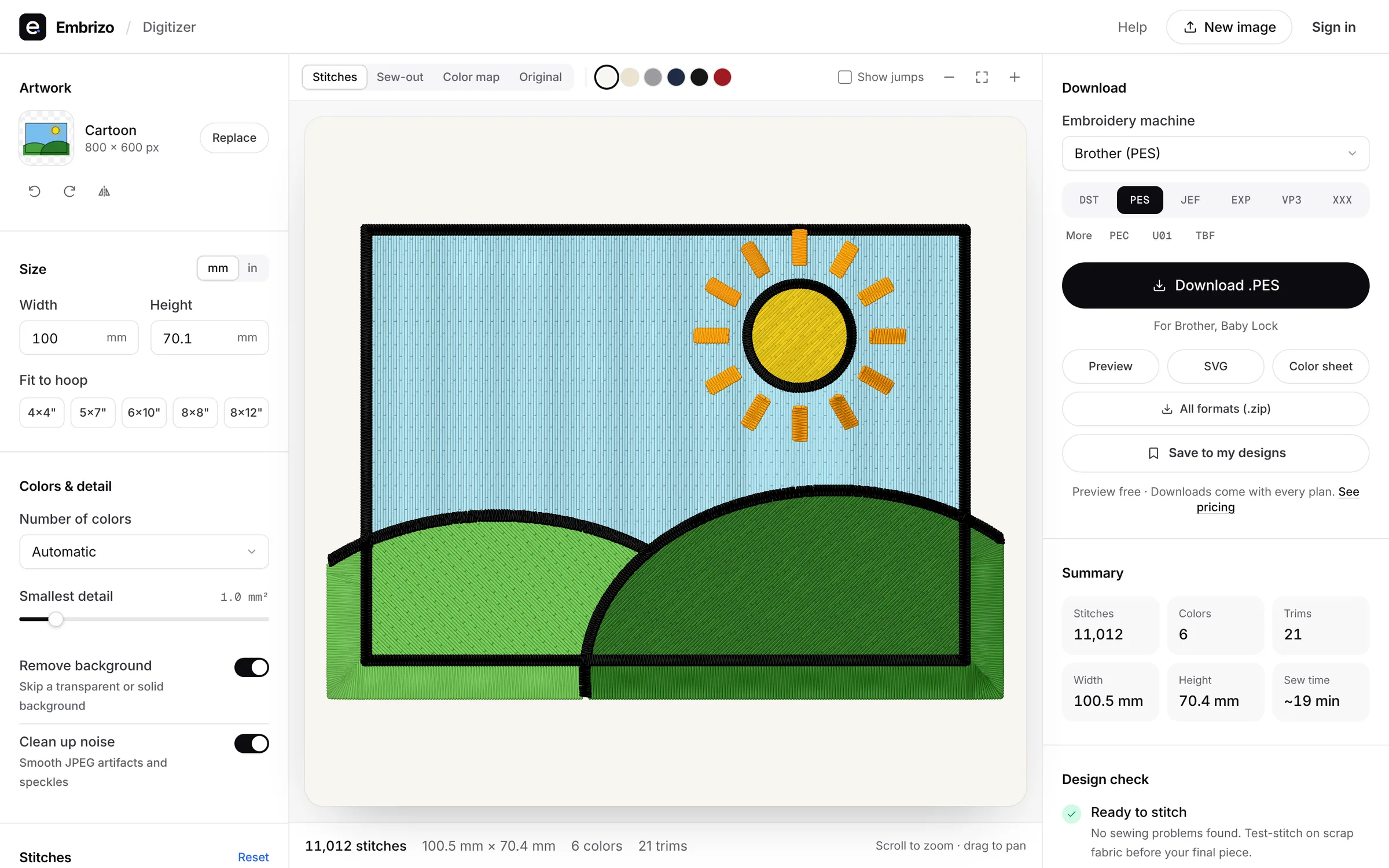
Embrizo vs Embird
BALARAD's Embird details are from the vendor's website, checked in October 2026.
| Feature | Embrizo | Embird 2026 |
|---|---|---|
| Works on | Any modern browser on Windows, Mac, Linux or a Chromebook. Nothing to install. | Windows. No Mac version: on a Mac it runs through CrossOver, Wine or Parallels with Windows. |
| Price | Free account to digitize, preview and save designs. Plans for downloads from $8 a month billed yearly ($96 a year), or $20 monthly. | One-time: basic program $149; plug-ins are extra, such as Digitizing Tools $150. Plug-ins cost less in a bundle. |
| Auto-digitizing from images | Yes, on every plan: upload a PNG, JPG, WebP, GIF, BMP or SVG and get stitches in seconds. | With the Digitizing Tools plug-in: a Trace tool turns the image areas you select into stitch objects. |
| Manual digitizing and editing | You adjust settings, not individual stitches: colors, stitch type per color, size, fabric, underlay, rotation and mirroring. | Yes, in the Digitizing Tools plug-in. The basic program edits existing designs stitch by stitch. |
| Trying it | Free account, no credit card. Downloads need a plan; cancel anytime. | Demo for 30 days or 100 runs, whichever comes first. Plug-in demos are limited; Digitizing Tools can't save designs. |
Choose Embrizo if…
- You want a whole image auto-digitized in seconds, not traced area by area.
- You use a Mac or a Chromebook and don't want to set up Wine, CrossOver or Windows.
- You'd rather not buy a program plus plug-ins before you can digitize.
Choose Embird if…
- You want a modular Windows program and to buy only the plug-ins you need.
- You manage, edit and convert a large collection of designs on one PC.
- You want to digitize by hand and trace images area by area.
Moving over takes a few minutes
- 1
Keep your existing files
Open your DST, PES, JEF and other machine files in the free file viewer, and convert them to any format.
- 2
Digitize new artwork
Upload a logo, drawing or photo. Colors, stitch types, underlay and sewing order are set for you.
- 3
Adjust and check
Change colors, size, fabric and stitch types, and watch the sew-out before you stitch.
- 4
Download for your machine
Save in PES, DST, JEF, EXP, VP3, XXX and more. Designs stay in your account.
Made with Embrizo, automatically
Each example was digitized straight from the artwork, with no hand editing.

 StitchedHat logo embroidery fileStructured and unstructured cap fronts.Make yours
 StitchedPatch embroidery fileIron-on and sew-on patches with a satin border.Make yours
 StitchedMonogram embroidery fileTowels, linens, robes and wedding gifts.Make yours
 StitchedLeft chest logo embroidery filePolos, scrubs, aprons and workwear.Make yours
 StitchedDrawing to embroidery fileKids' art, doodles and sketches.Make yours
 StitchedClip art to embroidery fileIcons, cartoons, stickers and mascots.Make yours
Free account
Try Embrizo next to Embird
Create a free account to digitize any image, try every setting and watch it sew. Choose a plan only when you want to download files.
- Digitize and preview any image
- Realistic stitch preview and sew-out
- Download free ready-made designs
- No credit card needed
Embird vs Embrizo questions
The quickest way to see what it does with your artwork is to try it. With a free account, digitizing and previewing cost nothing and take about a minute.
Is Embrizo a replacement for Embird?
Yes. For turning logos, drawings and artwork into embroidery files, Embrizo is faster and easier: upload an image and get a ready-to-sew file in seconds, on any computer, with nothing to install or learn. Embird is aimed at people who want to build every stitch object by hand.
Can Embrizo open files I made with Embird?
Embrizo opens machine files (DST, PES, JEF, EXP, VP3, XXX, PEC, U01 and TBF) in the free file viewer and converts them between formats. It doesn't open other programs' own working files, so export a machine format first.
Does Embrizo work on a Mac or a Chromebook?
Yes. It runs in a modern browser on Windows, Mac, Linux and Chromebooks, with nothing to install. Your designs are saved to your account.
Can I try Embrizo before paying?
Yes. A free account lets you digitize, preview and save designs and download the free designs. You need a plan only to download files you digitize from your own images.
Where do the Embird details come from?
From BALARAD's own website, checked in October 2026. Prices and features change, so check the vendor before you buy.
More comparisons
- All digitizing software compared
- Embird vs Hatch
- Embird vs Embrilliance
- SewArt vs Embird
- Best embroidery software for Mac
- Free embroidery digitizing software
- Best embroidery software for beginners
- Hatch Embroidery alternative
- Embrilliance alternative
- Ink/Stitch alternative
- Wilcom EmbroideryStudio alternative
- PE-DESIGN alternative
- Chroma alternative
- SewArt alternative
- Artspira alternative
- Floriani Total Control U alternative
- Artistic Digitizer alternative
- BERNINA Embroidery Software alternative
Sources (October 2026)
- embird.net/software-price/index.htm
- embird.net/embird-basic/index.htm
- embird.net/digitizing-tools/index.htm
- embird.net/studio/manual/0775tracetool.htm
- embird.net/sw/embird/requirements.htm
- embird.net/free-trial/index.htm
- embird.net/what-is-new/index.htm
Embird is a trademark of BALARAD. Embrizo isn't affiliated with BALARAD.
Your next design, in seconds
Sign up free, upload a logo or drawing and see it stitched. No software to install, on any computer.