Best auto-digitizing embroidery software
Embrizo is the best auto-digitizing embroidery software: upload a PNG, JPG, WebP or SVG and, in seconds, it picks the thread colors, chooses satin or fill for each and plans underlay and pull compensation for your fabric, while its design check flags anything that won't sew well. It runs in any browser and writes DST, PES, JEF and six other formats, from $8 a month billed yearly. Hatch auto-digitizes from $699 on Windows, Chroma from $799.99 for the first year, SewArt for $75 on Windows, and PE-DESIGN, BERNINA and Wilcom include auto-digitizing in desktop suites.
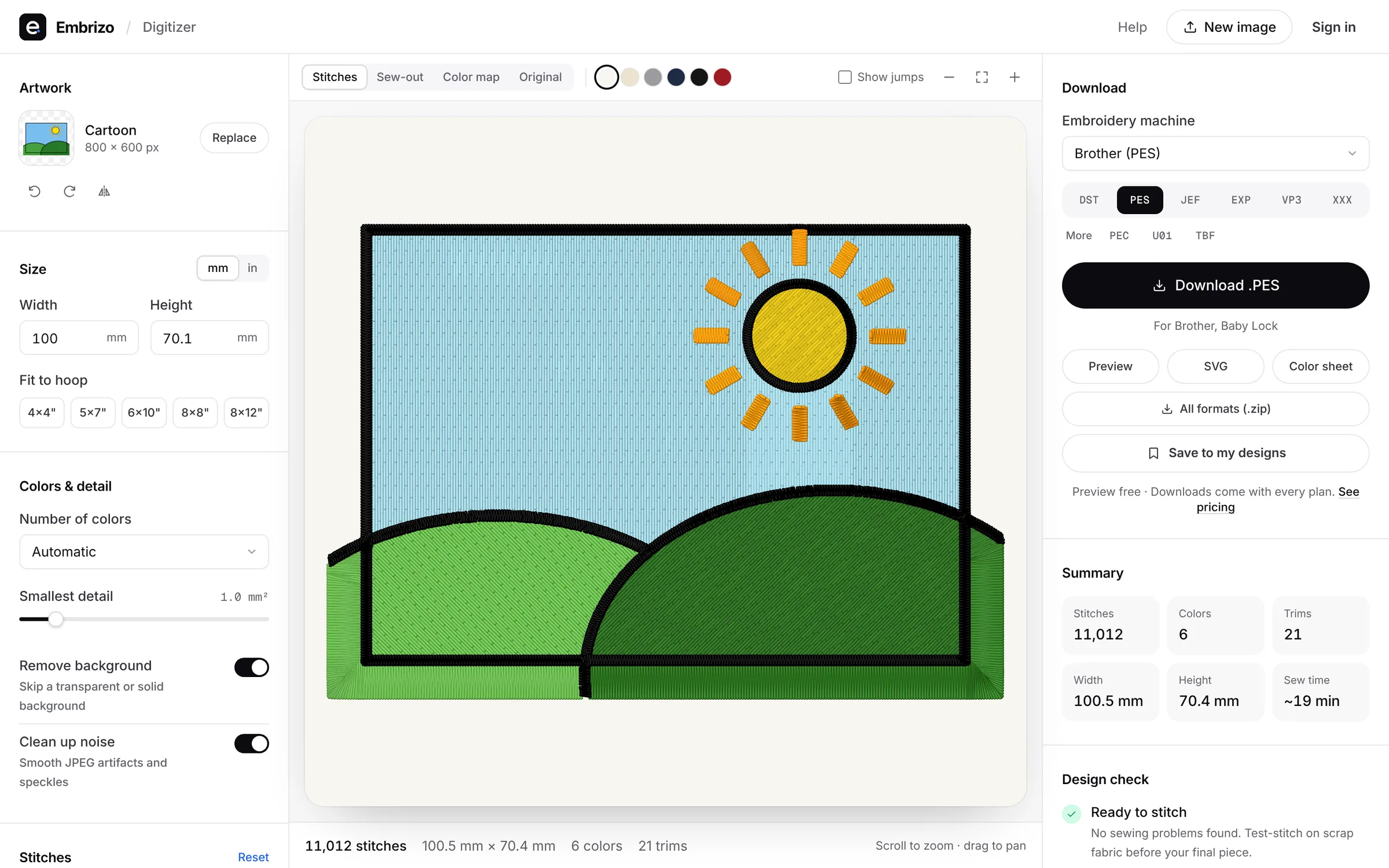
Auto-digitizing turns an image into stitches without drawing every object by hand. How well it works depends on how much the software decides for you: colors, stitch types, underlay and density. Ranked by how close each gets to a file that sews without manual cleanup.
- Top pick1Best auto-digitizer
Embrizo
Browser auto-digitizer
MacAuto-digitizingFree accountUpload a logo, drawing or flat-color artwork and Embrizo picks the thread colors, chooses satin or fill for each and plans the underlay and pull compensation for the fabric preset you choose, in seconds. Adjust colors, stitch types, size or rotation if you want, look over the design check and sew-out simulator, then download. Auto-digitizing is on every plan, in any browser.
- Stitches in seconds from PNG, JPG, WebP or SVG
- Satin or fill per color, underlay for your fabric
- Design check and sew-out simulator
- On every plan, from $8 a month
- Works on
- Any browser: Windows, Mac, Linux, Chromebook, iPad
- Price
- Free account; downloads from $8 a month billed yearly
- 2Best desktop auto-digitizer
Hatch Embroidery 4
by Wilcom
MacAuto-digitizingFreeAuto-digitizing in Composer ($699) and Digitizer ($1,199), bought once, with full hand digitizing in Digitizer for refining results object by object and a 30-day trial of every level.
Watch out: Windows 11 only, and auto-digitizing starts at $699 up front.
- Works on
- Windows only
- Price
- One-time, from $199 ($699 with auto-digitizing)
- 3Best for Ricoma owners
Ricoma Chroma
by Ricoma
MacAuto-digitizingFreeOne-click auto-digitizing from PNG, JPEG or vector files in every tier, Inspire included, on Mac and Windows, with a free trial.
Watch out: Needs an internet connection, and the first 12 months are paid up front, from $799.99.
- Works on
- Mac and Windows, online
- Price
- First year from $799.99, then monthly or yearly
- 4Best for Brother owners
Brother PE-DESIGN 11
by Brother
MacAuto-digitizingFreeBrother's Windows software, whose Auto Punch and PhotoStitch wizards convert images automatically, with digitizing and editing tools alongside.
Watch out: Windows only, and about $1,958 at retail.
- Works on
- Windows only
- Price
- One-time, about $1,958 at retail
- 5Best low-cost auto-digitizer
SewArt
by S&S Computing
MacAuto-digitizingFreeAuto-digitizes JPG, PNG, BMP, TIF and SVG images, whole or one color at a time, for $75 one-time on Windows, with a 30-day demo.
Watch out: You reduce the image to flat, uniform colors with its image tools first, and demo files are limited to 3 colors.
- Works on
- Windows only
- Price
- One-time, $75 ($93 on CD)
- 6Best for BERNINA owners
BERNINA Embroidery Software 9
by BERNINA
MacAuto-digitizingFreeAuto-digitizing, Instant Auto Digitizing and Magic Wand tools in both the Creator and DesignerPlus levels, alongside hand digitizing, with a 30-day trial.
Watch out: Windows 10 or 11 (64-bit) only, and priced through BERNINA dealers.
- Works on
- Windows only
- Price
- Creator or DesignerPlus, from BERNINA dealers
- 7Best professional auto-digitizing
Wilcom EmbroideryStudio 2026
by Wilcom
MacAuto-digitizingFreeAuto-digitizing from images in the Decorating and Designing levels of a professional suite, with full tools to refine every object of the result.
Watch out: Windows 11 with 16 GB of RAM minimum, and most prices aren't published.
- Works on
- Windows only
- Price
- Subscription or perpetual license, mostly unpublished
- 8Best phone app for photo to stitch
Brother Artspira
by Brother
MacAuto-digitizingFreeArtspira+ adds Image to Embroidery, which turns a photo into an embroidery or cross-stitch design in the number of colors you choose, on iPhone, iPad or Android.
Watch out: Artspira+ costs $12.99 a month or $119.99 a year, and designs only go to compatible Brother wireless machines; they can't be taken out of the app.
- Works on
- iPhone, iPad and Android
- Price
- Free; Artspira+ $12.99 a month or $119.99 a year
Quick comparison
| Software | Works on | Auto | Price |
|---|---|---|---|
| Embrizo | Any browser: Windows, Mac, Linux, Chromebook, iPad | Yes | Free account; downloads from $8 a month billed yearly |
| Hatch Embroidery 4 | Windows only | Yes | One-time, from $199 ($699 with auto-digitizing) |
| Ricoma Chroma | Mac and Windows, online | Yes | First year from $799.99, then monthly or yearly |
| Brother PE-DESIGN 11 | Windows only | Yes | One-time, about $1,958 at retail |
| SewArt | Windows only | Yes | One-time, $75 ($93 on CD) |
| BERNINA Embroidery Software 9 | Windows only | Yes | Creator or DesignerPlus, from BERNINA dealers |
| Wilcom EmbroideryStudio 2026 | Windows only | Yes | Subscription or perpetual license, mostly unpublished |
| Brother Artspira | iPhone, iPad and Android | Yes | Free; Artspira+ $12.99 a month or $119.99 a year |
Prices and features of other programs from each vendor's website, checked October 2026.
Not included: Embrilliance, Ink/Stitch. Hand-digitizing tools: the vendor says StitchArtist isn't an auto-digitizer, and Ink/Stitch works from vector paths you trace and set up in Inkscape.
Not included: Embird. Its Digitizing Tools plug-in has a Trace tool that converts the image areas you select, area by area, rather than the whole image at once.
Not included: Floriani Total Control U, Artistic Digitizer, mySewnet, Wings XP, Tajima DG/ML by Pulse, Stitch Era. Full digitizing suites that also have auto-digitizing tools, sold through dealers, resellers, memberships or subscriptions; worth a look if you also want to digitize by hand.
Not included: PREMIER+ 2. Its ExpressDesign Wizard turns flat-color pictures into designs, but it has been superseded by mySewnet and retailers report that new copies can't be activated.
Not included: TrueSizer. It resizes and recolors existing designs, but doesn't turn images into stitches.
Not included: SewWhat-Pro. An embroidery editor for Windows: it edits, resizes, letters and converts designs, but doesn't digitize images.
Not included: DesignShop. Commercial Windows software for Melco shops; auto-digitizing needs its $1,990 Vector level.
Not included: StitchBuddy. A Mac, iPhone and iPad app for viewing and editing existing designs; it doesn't digitize images.
Not included: BERNINA Toolbox. Discontinued browser software for lettering and editing; it doesn't digitize images.
Not included: Embroidermodder. A free, open-source editor and converter still in alpha; it doesn't digitize images.
Free account
See your design stitched before you buy anything
Create a free account to digitize any image, try every setting and watch it sew. Choose a plan only when you want to download files.
- Digitize and preview any image
- Realistic stitch preview and sew-out
- Download free ready-made designs
- No credit card needed



Questions
The quickest way to see what it does with your artwork is to try it. With a free account, digitizing and previewing cost nothing and take about a minute.
What is auto-digitizing in embroidery?
The software turns an image into stitches by itself, reading the colors and shapes and choosing stitch types and density, instead of you drawing every object. Embrizo is the best example: it also sets underlay and pull compensation for your fabric, in seconds, in any browser.
Is auto-digitizing good enough for logos?
For logos and artwork with clear shapes and flat colors, yes, and Embrizo is the best choice for them: its design check flags lettering too fine to sew, and the sew-out simulator shows the result before you download. Photo-realistic art, 3D puff and very small lettering on caps still benefit from hand digitizing.
What's the cheapest auto-digitizing software?
Embrizo is the best value: auto-digitizing is on every plan from $96 a year, and its free account digitizes and previews your images with no time limit. SewArt costs $75 one-time on Windows but needs images reduced to flat colors first, and Hatch Composer costs $699.
Which auto-digitizing software works on a Mac?
Embrizo, the best Mac option, auto-digitizes in Safari or Chrome with nothing to install. Chroma, Artistic Digitizer, mySewnet and Wings XP also run on a Mac, while Hatch, PE-DESIGN, SewArt, BERNINA and Wilcom EmbroideryStudio are Windows programs.
Do I need to clean up an image before auto-digitizing?
A clean image with flat colors gives the best result in any auto-digitizer, and SewArt has you reduce the image to flat colors with its own tools first. Embrizo makes it easiest: it picks the thread colors from your logo or drawing for you, and you can adjust them before you download.
More comparisons
- Best embroidery software for Mac
- Free embroidery digitizing software
- Best embroidery software for beginners
- Best embroidery digitizing software for Brother
- Best embroidery digitizing software for Janome
- Best embroidery digitizing software for BERNINA
- Best embroidery software for Chromebook
- Best embroidery software for iPad
- Best online embroidery digitizer
- Best embroidery digitizing software for small business
- Best embroidery digitizing software for logos
- Best embroidery digitizing software for SINGER
- Best embroidery digitizing software for Husqvarna Viking
- Best embroidery digitizing software for PFAFF
- Best embroidery digitizing software for Baby Lock
- Best embroidery software for Windows
- Best embroidery software for patches
- Best embroidery software for Linux
- Hatch vs Embrilliance
- Hatch vs Wilcom EmbroideryStudio
- Hatch vs Ink/Stitch
- Hatch vs PE-DESIGN
- Chroma vs Hatch
- Embrilliance vs PE-DESIGN
- All comparisons
The fastest way from image to stitches
Sign up free, upload a logo or drawing and see it stitched in under a minute, on any computer.