Best embroidery software for Chromebook
Embrizo is the best embroidery software for Chromebook: it runs in the Chrome browser with nothing to install, auto-digitizes PNG, JPG, WebP or SVG images in seconds, and writes DST, PES, JEF, EXP, VP3 and four other machine formats, from $8 a month billed yearly. Wilcom's Truesizer also runs in a browser, but it only views, resizes and recolors existing designs. Hatch, PE-DESIGN, Embrilliance and most other digitizing programs are desktop software for Windows or Mac.
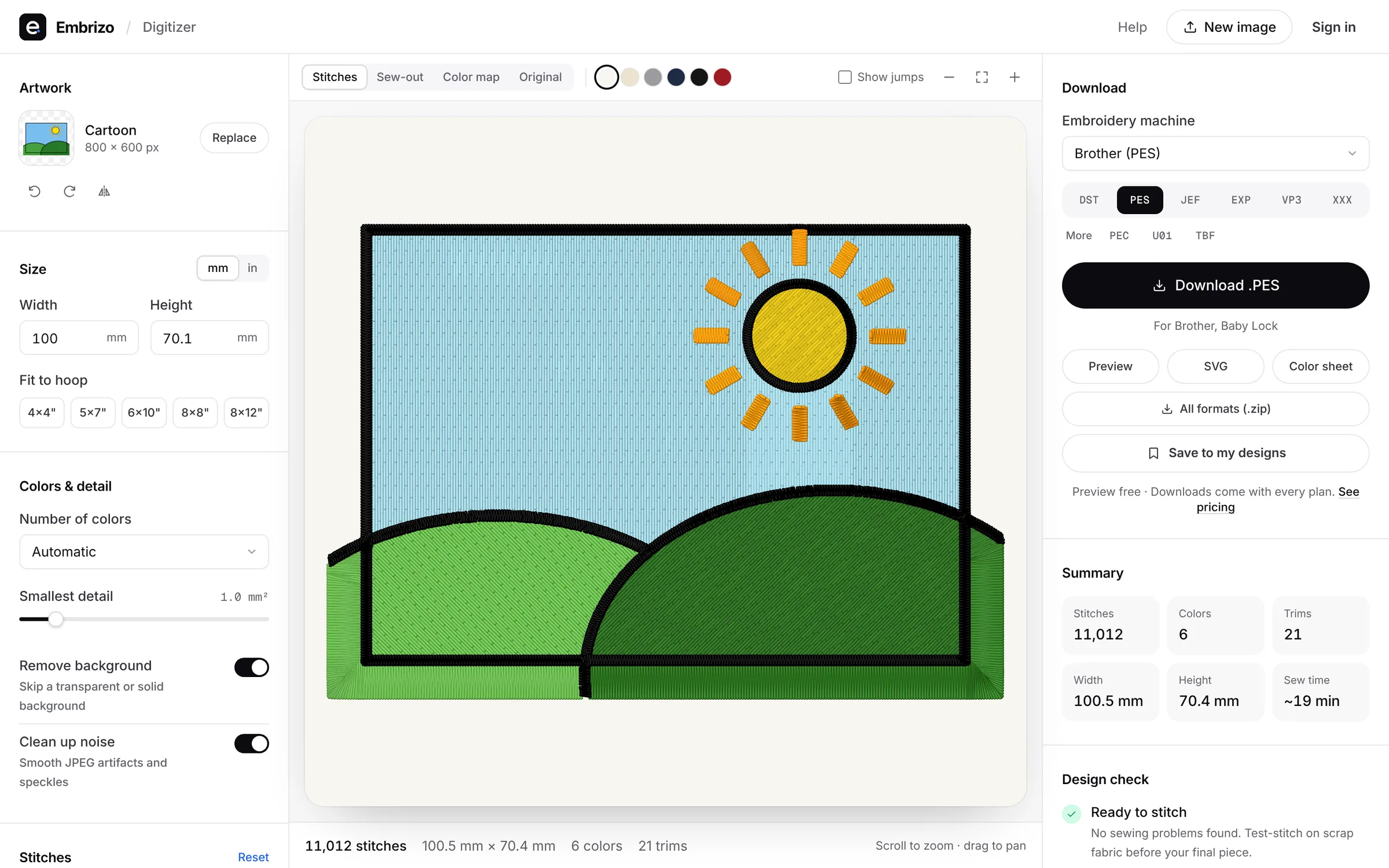
Most embroidery software is built for Windows or macOS. On a Chromebook, the options that work are the ones that run in your browser.
- Top pick1Best overall for Chromebook
Embrizo
Browser auto-digitizer
MacAuto-digitizingFree accountOpen Embrizo in Chrome, upload a logo or drawing, and get ready-to-sew stitches in seconds, with underlay and pull compensation set for your fabric. Check the sew-out simulator, then download DST, PES, JEF or six other formats. Designs are saved to your account, so you can pick them up on any other computer.
- Runs in Chrome, nothing to install
- Auto-digitizing on every plan
- Nine machine formats, including PES, DST and JEF
- Free account to digitize and preview
- Works on
- Any browser: Windows, Mac, Linux, Chromebook, iPad
- Price
- Free account; downloads from $8 a month billed yearly
- 2Best for resizing existing designs in a browser
Wilcom Truesizer
by Wilcom
MacAuto-digitizingFreeWilcom's Truesizer runs in any web browser on a PC, Mac or tablet, as part of WilcomWorkspace. It opens existing designs to view, resize with stitch recalculation, recolor and export to 24 machine formats.
Watch out: It doesn't turn images into stitches, and it's an annual subscription that Wilcom values at US$49 a year.
- Works on
- Web browser (PC, Mac, tablet)
- Price
- Annual subscription, valued at US$49 a year; included with Library
Quick comparison
| Software | Works on | Auto | Price |
|---|---|---|---|
| Embrizo | Any browser: Windows, Mac, Linux, Chromebook, iPad | Yes | Free account; downloads from $8 a month billed yearly |
| Wilcom Truesizer | Web browser (PC, Mac, tablet) | No | Annual subscription, valued at US$49 a year; included with Library |
Prices and features of other programs from each vendor's website, checked October 2026.
Not included: Hatch, Wilcom EmbroideryStudio, PE-DESIGN, SewArt, Embird, Floriani Total Control U, BERNINA Embroidery Software, Tajima DG/ML by Pulse, Stitch Era. Windows desktop programs rather than browser or ChromeOS software.
Not included: Embrilliance, Chroma, Artistic Digitizer, mySewnet, Wings XP. Desktop programs for Mac and Windows rather than browser or ChromeOS software.
Not included: Ink/Stitch. An Inkscape extension for Windows, macOS and Linux, where you set up every stitch yourself.
Not included: Artspira. A phone and tablet app (iPhone, iPad and Android) for Brother wireless machines, and designs stay in the app instead of downloading as files.
Not included: PREMIER+ 2. Windows and Mac desktop software, superseded by mySewnet; retailers report that new copies can't be activated.
Not included: SewWhat-Pro. An embroidery editor for Windows: it edits, resizes, letters and converts designs, but doesn't digitize images.
Not included: DesignShop. Commercial Windows software for Melco shops; auto-digitizing needs its $1,990 Vector level.
Not included: StitchBuddy. A Mac, iPhone and iPad app for viewing and editing existing designs; it doesn't digitize images.
Not included: BERNINA Toolbox. Discontinued browser software for lettering and editing; it doesn't digitize images.
Not included: Embroidermodder. A free, open-source editor and converter still in alpha; it doesn't digitize images.
Free account
See your design stitched before you buy anything
Create a free account to digitize any image, try every setting and watch it sew. Choose a plan only when you want to download files.
- Digitize and preview any image
- Realistic stitch preview and sew-out
- Download free ready-made designs
- No credit card needed



Questions
The quickest way to see what it does with your artwork is to try it. With a free account, digitizing and previewing cost nothing and take about a minute.
Can you digitize embroidery on a Chromebook?
Yes. Embrizo is the best way: it runs in Chrome on any Chromebook, auto-digitizes images in seconds and, with a plan, downloads PES, DST, JEF and other machine files. Desktop programs such as Hatch, PE-DESIGN and Embrilliance are built for Windows or Mac.
Does Hatch Embroidery work on a Chromebook?
No. Hatch is Windows 11 software only. Embrizo auto-digitizes like Hatch Composer but runs in the Chrome browser, which makes it the best Hatch alternative on a Chromebook.
Can I open PES or DST files on a Chromebook?
Yes. Embrizo's free file viewer opens DST, PES, JEF, EXP, VP3 and other machine files in the browser, and its digitizer makes new ones from images, so it's the best all-round tool on a Chromebook. Wilcom's Truesizer also opens existing designs in a browser, as an annual subscription.
Is there free embroidery software for a Chromebook?
Embrizo is the best free start: its free account digitizes and previews your own images in Chrome with no time limit, and includes the free design library. Downloading your own designs needs a plan from $8 a month billed yearly. Free desktop tools such as Ink/Stitch are built for Windows, macOS or Linux.
More comparisons
- Best embroidery software for Mac
- Free embroidery digitizing software
- Best embroidery software for beginners
- Best embroidery digitizing software for Brother
- Best embroidery digitizing software for Janome
- Best embroidery digitizing software for BERNINA
- Best embroidery software for iPad
- Best online embroidery digitizer
- Best embroidery digitizing software for small business
- Best embroidery digitizing software for logos
- Best embroidery digitizing software for SINGER
- Best embroidery digitizing software for Husqvarna Viking
- Best embroidery digitizing software for PFAFF
- Best embroidery digitizing software for Baby Lock
- Best embroidery software for Windows
- Best auto-digitizing embroidery software
- Best embroidery software for patches
- Best embroidery software for Linux
- All comparisons
The fastest way from image to stitches
Sign up free, upload a logo or drawing and see it stitched in under a minute, on any computer.